Prioritized inbox
Review requests, blocked work, merge-ready changes, open threads, and work waiting on others — ordered around your next move.
Triage, understand, and review changes from one focused native workspace.
$ brew install --cask volnei/tap/reviewly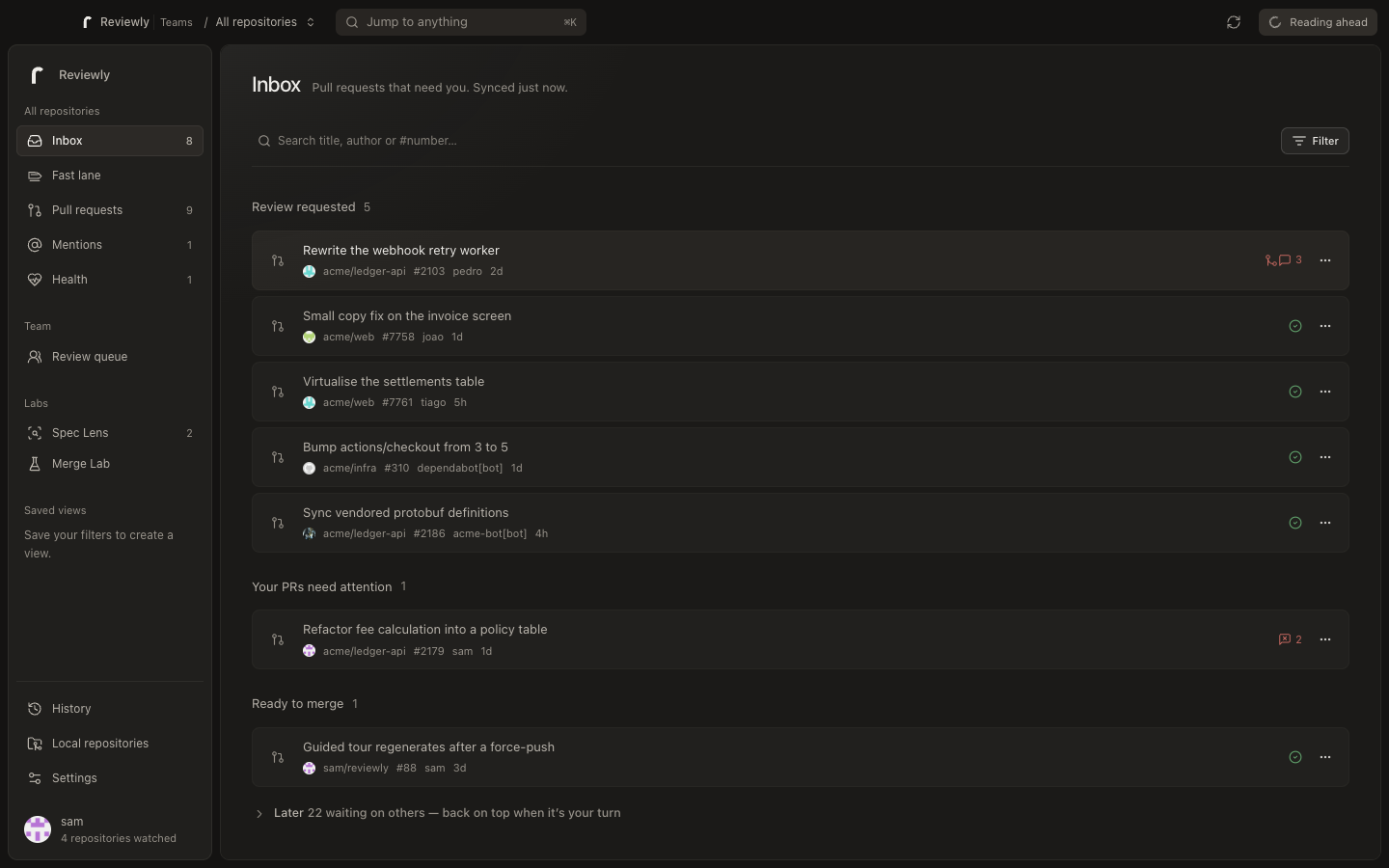
One native place to triage, understand, and finish every pull request.
Review requests, failing checks, conflicts, and unresolved threads — ordered around your next decision.
See the change. Make the call. Move on.
From the first signal to the final decision — including private AI, native tools, Labs, and team coordination.
Everything from the first signal to the final decision.
Review requests, blocked work, merge-ready changes, open threads, and work waiting on others — ordered around your next move.
See the change map, checks, unresolved context, activity, and a suggested reading order before opening the diff.
Switch between unified and split views, expand context, hide whitespace-only changes, wrap lines, and track viewed files.
Inline comments survive navigation and restarts until you submit a comment, approval, or request for changes.
Read, reply to, and resolve threads without losing the file context. Reactions and labels stay close to the decision.
Catch direct mentions, failed checks, conflicts, blocked merges, and changes that are becoming stale.
Filter large accounts quickly and keep the views you return to instead of rebuilding the same query.
Move through reviews from the keyboard, open the shortcut sheet, and revisit recent actions when context changes.
Useful context without sending your code to a mandatory Reviewly AI service.
Turn a pull request into coherent areas, intent, and risk before reading every line.
Walk through files and lines in an order that follows the change instead of the alphabet.
Keep a focused conversation attached to the pull request you are trying to understand.
Use Claude CLI, Codex CLI, Gemini CLI, or your own OpenAI-compatible endpoint.
Apply the repository’s conventions to briefings, guided reviews, and conversations.
Let local tools inspect the repository already on your machine; Reviewly does not need to upload it.
Fast, private, and present even when the browser is not.
A local SQLite cache keeps navigation fast and preserves the state you have already built up.
GitHub credentials stay in Keychain, Credential Manager, or Secret Service — never in a plain settings file.
Get review alerts plus dock and tray counts without keeping a web tab open.
Watched repositories reconcile quietly so the inbox reflects what changed while you were away.
Install on macOS, Windows, or Linux, update automatically, or use the Homebrew cask.
Connect GitHub Enterprise Server with its own host and authentication flow.
Connect the clones on your machine and move between remote review context and local code.
No Reviewly telemetry and no hosted Reviewly AI backend in the individual app.
Deeper tools for the work around a pull request.
Inspect local Turbo workspaces for package boundaries, dependency cycles, phantom dependencies, version drift, and blast radius.
Work with OpenSpec changes, draft proposals with AI, and create an isolated worktree and branch without touching your checkout.
Simulate up to eight pull requests together, find a merge order, inspect blast radius, and optionally prove it in a temporary local worktree.
Shared coordination when the review queue belongs to everyone.
Give the organization one ordered view of every pull request that needs the team.
Make the current owner and next action visible instead of coordinating in side conversations.
Set urgency and review expectations so important changes do not disappear into chronological order.
Let the team define which small, safe changes can leave the queue early — with protected paths and size limits.
Keep organization repositories current through a revocable GitHub App installation and webhooks.
Bring GitLab merge requests, discussions, and approvals into the same shared review workflow.
Send assignments and reminders to Slack and put review actions where the team is already talking.
Manage organization membership and per-seat billing from one Teams account.
The Teams service coordinates review metadata; source code and diffs stay with your Git provider and app.
No review disappears into another tab. No teammate wonders who owns it.
Everything you need to review alone stays free. Upgrade when the queue belongs to the whole team.
| Feature | HobbyFreeForeverDownload ReviewlyDownload | Teams$8Per member / monthSet up your teamChoose Teams |
|---|---|---|
| Native desktop app | ||
| Repositories | Unlimited | Unlimited |
| GitHub Enterprise | ||
| Private AI providers | ||
| Shared review queue | — | |
| GitLab and Slack | — | |
| Fastlane rules | — | |
| Priority and SLA | — |
Yes. The complete individual app is open source and free forever. Teams is the paid coordination layer for organizations.
Yes. Connect your company hostname using GitHub CLI or a personal access token. Reviewly derives the Enterprise REST and GraphQL endpoints automatically.
Yes. Connect GitLab.com to bring merge requests, discussions, and approvals into your organization’s shared review queue.
Reviewly Teams sends assignments and reminders to your Slack workspace, with review actions available where the team is already talking.
No. Hobby mode has no Reviewly AI backend. You choose a local CLI or an OpenAI-compatible endpoint and trigger every action yourself.
In your operating system keychain: Keychain on macOS, Credential Manager on Windows, and Secret Service on Linux.
